> ## Documentation Index
> Fetch the complete documentation index at: https://docs.kasoftware.com/llms.txt
> Use this file to discover all available pages before exploring further.

# xmlDOMSearch

> 使用 xpath 迴圈輸入 XML 文件中的元素，以列舉重複結構。

迴圈輸入 XML 文件中的元素。

## 必需的參數

* **xpath**: 要迴圈的指定片段的從 1 開始的索引 xpath。例如，`<arc:set attr="myinputitem.xpath" value="/Items/foo/" />`。

## 可選的參數

* **uri**: XML 檔案 URI。例如，`http://mydomain.com/resources/somedata.xml`、`/tmp/myfile.xml` 或 `[FilePath]`。
* **text**: XML 資料的可讀控制代碼引用。該控制代碼由 [xmlOpen](./op-xml-open) 運算器建立，當輸入 XML 不是檔案或原始文字，或需要執行多個存取文件檔案資料的操作時，此控制代碼很有幫助。
* **handle**: XML 資料的可讀控制代碼引用。該控制代碼由 xmlOpen 運算器建立，僅當目標 XML 不是輸入檔案時才需要。有關詳細資訊和範例，請參閱 [xmlOpen](./op-xml-open)。

## 輸出屬性

* **xpath**: 傳回正在迴圈的指定元素的完整從 1 開始的索引 xpath。例如，`[myoutitem.xpath]` 會解析為 `foo` XML 元素的 xpath，即 `/Items/foo[1]`。
* **xname**: 傳回正在迴圈的元素的名稱。例如，`[myoutitem.xname]` 會解析為 `foo` XML 元素的名稱，即 `foo`。

## 範例

請考慮以下作為輸入檔案傳入的 XML：

```xml theme={null}
<Items>
    <hello>world</hello>
    <colors>
        <color>yellow</color>
        <example>banana</example>
    </colors>
    <colors>
        <color>red</color>
        <example>apple</example>
    </colors>
    <colors>
        <color>orange</color>
        <example>orange</example>
    </colors>
</Items>
```

你可以使用 xmlDOMSearch 運算器列舉每個 `colors` 父元素中的所有子元素，如下所示：

```xml theme={null}
<!-- Setting the input uri and xpath -->
<arc:set attr="xml.uri" value="[FilePath]" />
<arc:set attr="xml.xpath" value="/Items/colors" />

<!-- Calling the operation, passing in the xml item --> 
<arc:call op="xmlDOMSearch" in="xml" >
  <!-- Inside the call you can reference elements at paths relative to the input "xpath" -->
  <!-- In this example each color and example is written to the output data -->
  <arc:set attr="_log.info" value="Color = [xpath(color)]" />
  <arc:set attr="_log.info" value="Example = [xpath(example)]" />
</arc:call>

<!-- Setting the output file and pushing the file out -->
<arc:set attr="output.filepath" value="[FilePath]" />
<arc:push item="output" />
```

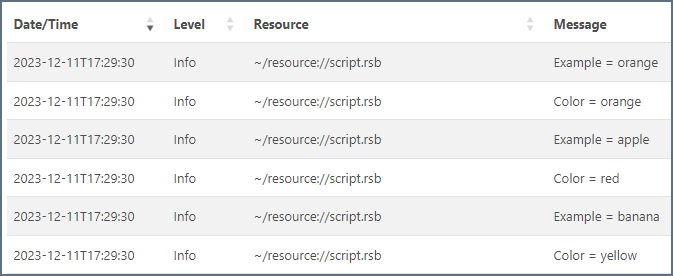
應用程式日誌中的輸出如下所示：

<img src="https://mintcdn.com/qiao/bVtjD3fvHFZBo1vE/public/images/jsonDOMSearch.png?fit=max&auto=format&n=bVtjD3fvHFZBo1vE&q=85&s=ad513378142485d723ebd18f73483e98" width="600" data-path="public/images/jsonDOMSearch.png" />