> ## Documentation Index
> Fetch the complete documentation index at: https://docs.kasoftware.com/llms.txt
> Use this file to discover all available pages before exploring further.
# AI 設定
> 如何為知行之橋中的 AI 功能配置 AI 提供商設定。
export const siteNameShort = "知行之橋";
此部分包含控制 {siteNameShort} 產品內 AI 功能行為的配置選項。要將外部 AI 用戶端連線到此 {siteNameShort} 例項,請參閱[遠端 MCP 伺服器](../../../admin-api/remote-mcp-server)。
點選**配置**即可開啟**配置 AI 設定**窗格。
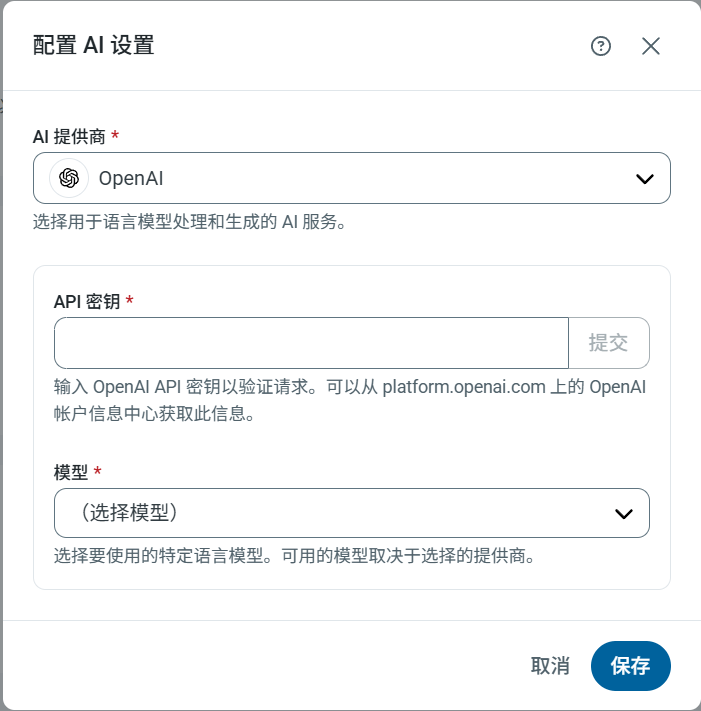 | 設定 | 描述 |
| ---------- | --------------------------------------------------------------------------------------------------------------------------------- |
| **AI 提供商** | 從清單中選擇 AI 提供商。目前支援的提供商包括 Claude、DeepSeek、Gemini、Grok、Ollama(雲端和本地)、OpenAI 以及 OpenAI Compatible(OpenAI 相容平臺)。接下來的設定將根據所選的提供商而有所不同。 |
| **API 金鑰** | 輸入 API 金鑰以進行請求身分驗證(除 Ollama 本地版外的所有提供商均需提供)。 |
| **基礎 URL** | 指定 *Ollama (Local)* 或 *OpenAI Compatible* 服務執行的端點 URL(例如,`http://localhost:11434`)。 |
| **模型** | 選擇要使用的特定語言模型。可用的模型取決於提供商。 |
並非所有開放原始碼模型都支援設定 JSON 架構以用於 {siteNameShort} 所需的回應。請確保選擇的**模型**具備此功能。
| 設定 | 描述 |
| ---------- | --------------------------------------------------------------------------------------------------------------------------------- |
| **AI 提供商** | 從清單中選擇 AI 提供商。目前支援的提供商包括 Claude、DeepSeek、Gemini、Grok、Ollama(雲端和本地)、OpenAI 以及 OpenAI Compatible(OpenAI 相容平臺)。接下來的設定將根據所選的提供商而有所不同。 |
| **API 金鑰** | 輸入 API 金鑰以進行請求身分驗證(除 Ollama 本地版外的所有提供商均需提供)。 |
| **基礎 URL** | 指定 *Ollama (Local)* 或 *OpenAI Compatible* 服務執行的端點 URL(例如,`http://localhost:11434`)。 |
| **模型** | 選擇要使用的特定語言模型。可用的模型取決於提供商。 |
並非所有開放原始碼模型都支援設定 JSON 架構以用於 {siteNameShort} 所需的回應。請確保選擇的**模型**具備此功能。